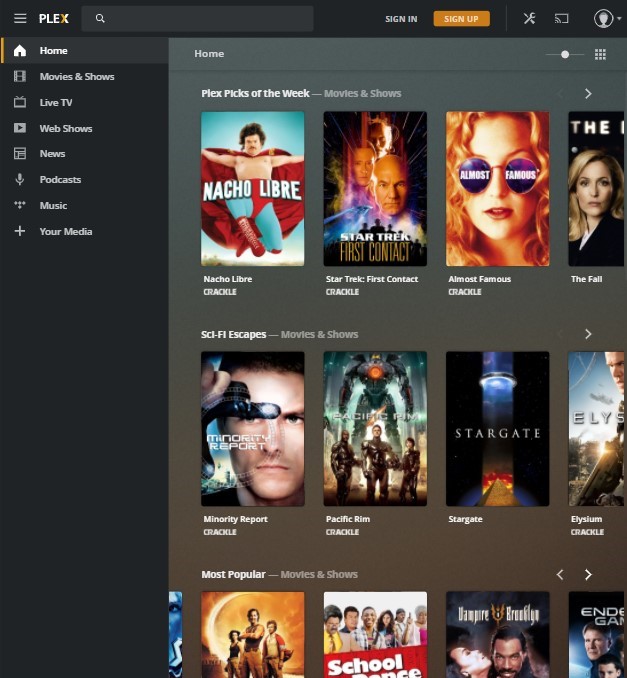
Create your Account
Visit https://plex.tv/web and press sign up. Once you have made your account press the button below and type in the email that you used to create your account.
by Ria Gupta
Visit https://plex.tv/web and press sign up. Once you have made your account press the button below and type in the email that you used to create your account.

Visit the App Store. Make your account and then sign up below. On iOS, to unlock the app, you have to pay $5. However, if you join our discord and ping me, I can give it to you for free ;)
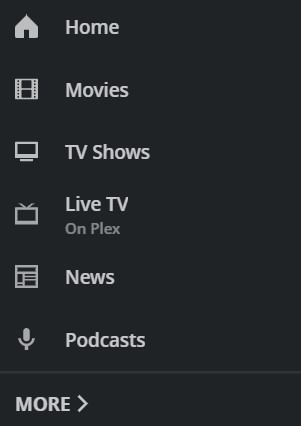
Now that you have access to my server, you can pin it to your home page and clean things up. To do this, open the sidebar on the left side by press the menu button (≡). Then, press more > press the three dots > pin. I recommend pinning the 2 shown here. The rest are offered by Plex.
Don't see a movie/show you want? Press the button below to request.
You will recieve an email with a link to connect to my Plex Server within 24 to 48 hours.
Want a movie or show added? Just ask.
Since Plex charges a one time $5 fee to unlock the Android and iOS Apps and allow playback for longer than one minute, I haven't gotten around to writing instructions. If you are willing to pay, just download the app, login with your account, and set up as usual.
Plex can run on almost anything that connects to the internet. That is the beauty of the platform. Plex runs free on Browsers (Desktop + Laptop), Streaming Devices (Smart TVs, Amazon Fire TV, Android TV, Apple TV, Chromecast, Roku, etc), and Gaming Consoles. The mobile Plex app (Android/iOS) requires a $5 one time fee to unlock, but it is well worth it in my opinion.
Plex itself is actually just a piece of software that takes your movie/show files (mp4, mkv, avi, etc) and projects them in a Netflix/Disney+/Hulu style interface that can be accessed from any device. There is actually no catch. The reason I run my server for free is because it's fun and I also use it myself.
The best thing that you can do to help is request movies and shows. Also, donations are accepted and encouraged but not forced ;)
PayPal: rakkigupta04@gmail.com.
CashApp: $cdiofficial
Ask Away!